Q2
Q2
 QIDI Box
 Plus 4
 Q1 Pro
 X-Max 3


Is PLA Filament for 3D Printing Toxic?


PLA filament is usually considered one of the lower-risk materials in desktop 3D printing, and it is commonly seen as a safer indoor choice than ABS. Still, heated PLA filament can release ultrafine particles and VOCs during printing. For most users, the key issue is indoor air exposure during long print jobs, especially in small rooms with poor ventilation. Good airflow, better printer placement, and an enclosure can make a real difference.
What Is PLA Filament and Why Is It Often Considered Safer Than ABS?
Before looking at printing risks, it helps to understand what PLA filament is and why it is often described as a safer material.
What Is PLA Filament?
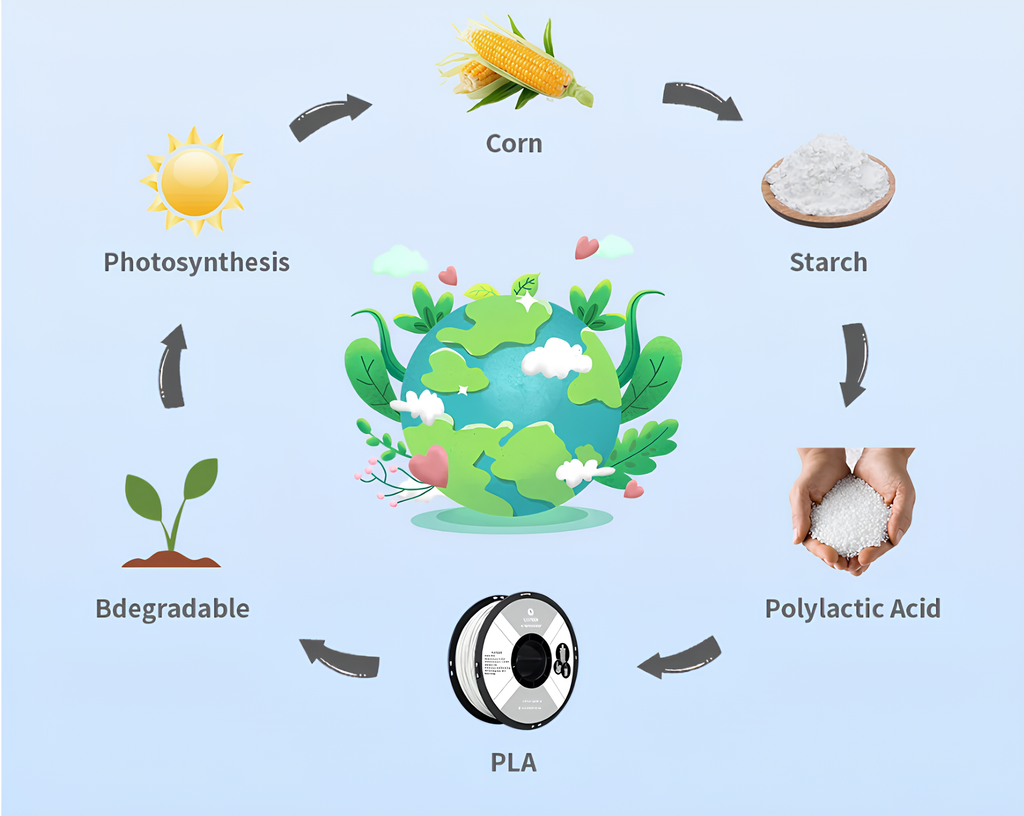
PLA filament is a common thermoplastic used in FDM 3D printing. It is made from renewable plant-based materials such as corn starch or sugarcane, which is one reason it is often marketed as a more eco-friendly option than some petroleum-based plastics.
In everyday 3D printing, PLA is popular because it is easy to print, works at lower nozzle temperatures, and usually causes fewer warping problems than harder-to-manage materials. For beginners, it is often the first filament they try.
Why Is PLA Often Considered Safer Than ABS?
PLA is often seen as safer than ABS because it usually prints at lower temperatures and tends to produce less odor during use. In many test conditions, it also gives off fewer airborne emissions than ABS, which is why many hobby users prefer PLA for indoor printing.
Still, lower risk does not mean no risk. A spool of PLA filament is not the main concern for most users. The bigger issue comes from the printing process itself, especially when the filament is heated for long periods in a room with poor ventilation.
Where the Real Risk Comes From: Particles and Emissions During Printing
For most home users, the real concern is not touching PLA filament. It is the breathing particles and emissions released during printing.
What Gets Into the Air
When PLA filament is heated and extruded, the process can release ultrafine particles and volatile organic compounds. Ultrafine particles are especially important because they are small enough to reach deeper parts of the respiratory system.
PLA usually releases fewer emissions than ABS, but it still releases emissions. That is why the honest answer to “Is PLA safe to breathe?” is conditional. In a good setup, risk is lower. In a small, closed room with regular long prints, the setup deserves attention.
Smell is also a poor safety test. A mild odor does not mean clean air. Some prints can release particles even when the room does not smell strong.
What Factors Affect Safety When Printing With PLA?
PLA filament does not behave the same way in every setup. Emissions can change with nozzle temperature, filament formula, color, print time, and room ventilation.
Nozzle Temperature
Higher nozzle temperatures can push emissions up. That makes print temperature one of the easiest practical controls for home users. Keeping the nozzle near the lower end of the recommended range can help, as long as print quality stays stable.
Filament Formula
Standard PLA, PLA+, silk PLA, wood-filled PLA, and other specialty blends should not be treated as identical. Additives, colorants, and formulation changes can affect emission levels. Different filament materials and colors can lead to very different emission rates.
Room Conditions
Room size, airflow, print time, and user distance all affect exposure. A short print in a ventilated workspace is very different from an overnight print next to a bed or desk in a closed room.
Is It Safe to Print PLA at Home? How to Evaluate Different Setups
For many adults, home printing with PLA filament can be reasonable when the printer runs in a separate area with decent airflow and people do not sit beside it for hours. Risk goes up in small enclosed rooms, especially spaces used for sleeping, studying, or long daily occupancy. Confined indoor spaces are also a bigger concern for children.
| Setup | Practical Reading |
| Separate room with steady airflow | Usually a reasonable setup for PLA |
| Garage, workshop, or home office with added ventilation | Often manageable for regular printing |
| Bedroom, nursery, dorm room, or small closed office | Poor setup for routine indoor printing |
If the printer runs where people sleep or work for long hours, the setup needs improvement, even if the material is PLA filament and the smell seems light.
How to Reduce PLA Printing Risks: Ventilation, Enclosures, and Daily Habits
Reducing exposure from PLA filament starts with the printing environment. Good airflow, better containment, and a few daily habits can lower the amount of particles and emissions that stay in your breathing space.
Ventilation
Ventilation helps remove airborne particles and gases released during printing. For regular indoor use, general room airflow may help, but it is often not enough on its own.
A better setup moves emissions away from the printer and out of the room. If possible, place the printer in a separate area and vent the air outdoors. HEPA filtration can also help reduce airborne particles during longer print jobs.
Enclosures
An enclosure helps contain emissions close to the printer. This is especially useful for long prints or setups in shared indoor spaces.
For better control, pair the enclosure with filtration or exhaust. After a print finishes, keep the enclosure closed for a short time before opening it. That can help reduce the amount of particles released into the room at once.
Daily Habits
A few simple habits can make indoor printing safer over time.
- Keep print temperature as low as practical for stable results.
- Avoid sitting next to the printer during long jobs.
- Put the printer in a separate room when possible.
- Clean nearby surfaces with wet wiping or a HEPA vacuum.
- Do not rely on a cracked window as your only control for frequent printing.
For most home users, the best results come from combining all three: better ventilation, an enclosed printer, and cleaner daily habits.
Create a Safer PLA Printing Setup From the Start
For most home users, PLA filament can be a safe and practical choice when the setup is handled properly. Lower print temperatures, better airflow, and smarter printer placement all help reduce indoor exposure. If you plan to print regularly, focus on ventilation, enclosure, and daily habits from the start. A safer setup supports better printing results and a more comfortable long-term experience.
FAQs about PLA 3D printing safety
Q1. Is PLA filament safe to use around pets?
PLA is usually a lower-risk option than many other filaments, but pets should still be kept away from active printers. Small animals are more sensitive to indoor air changes, heat, and moving parts. A separate room is safer than printing in a shared living area.
Q2. Can I stay in the same room while printing with PLA?
For short prints in a well-ventilated space, occasional time in the same room is usually manageable. For long prints, it is better to avoid sitting close to the printer for hours. More distance and less time near the machine usually mean lower exposure.
Q3. Does sanding or cutting PLA create another kind of risk?
Yes. Post-processing can create fine plastic dust, which is different from heated printing emissions. Sanding, drilling, or cutting PLA should be done with local dust control, light respiratory protection if needed, and easy surface cleanup, especially when you are finishing multiple parts indoors.
Q4. Is an air purifier enough to make PLA printing safe?
An air purifier can help, but it should not be treated as a complete solution. HEPA filters are useful for particles, while VOC reduction depends on the unit and filter type. Purifiers work best when combined with good placement, ventilation, and an enclosed printer setup.
Q5. When should I stop printing and improve my setup?
Stop and reassess the space if you notice recurring odor buildup, headaches, throat irritation, stale air, or visible dust collecting around the printer. You should also upgrade the setup if prints run often in a bedroom, dorm, or other small room used for long daily occupancy.
- What Is PLA Filament and Why Is It Often Considered Safer Than ABS?
- What Is PLA Filament?
- Why Is PLA Often Considered Safer Than ABS?
- Where the Real Risk Comes From: Particles and Emissions During Printing
- What Gets Into the Air
- What Factors Affect Safety When Printing With PLA?
- Nozzle Temperature
- Filament Formula
- Room Conditions
- Is It Safe to Print PLA at Home? How to Evaluate Different Setups
- How to Reduce PLA Printing Risks: Ventilation, Enclosures, and Daily Habits
- Ventilation
- Enclosures
- Daily Habits
- Create a Safer PLA Printing Setup From the Start
- FAQs about PLA 3D printing safety
- Q1. Is PLA filament safe to use around pets?
- Q2. Can I stay in the same room while printing with PLA?
- Q3. Does sanding or cutting PLA create another kind of risk?
- Q4. Is an air purifier enough to make PLA printing safe?
- Q5. When should I stop printing and improve my setup?
Recommended products