

 Q2
Q2
 QIDI Box
 Plus 4
 Q1 Pro
 X-Max 3


10 Stunning Multi-Color 3D Printing Projects to Inspire Your Creativity

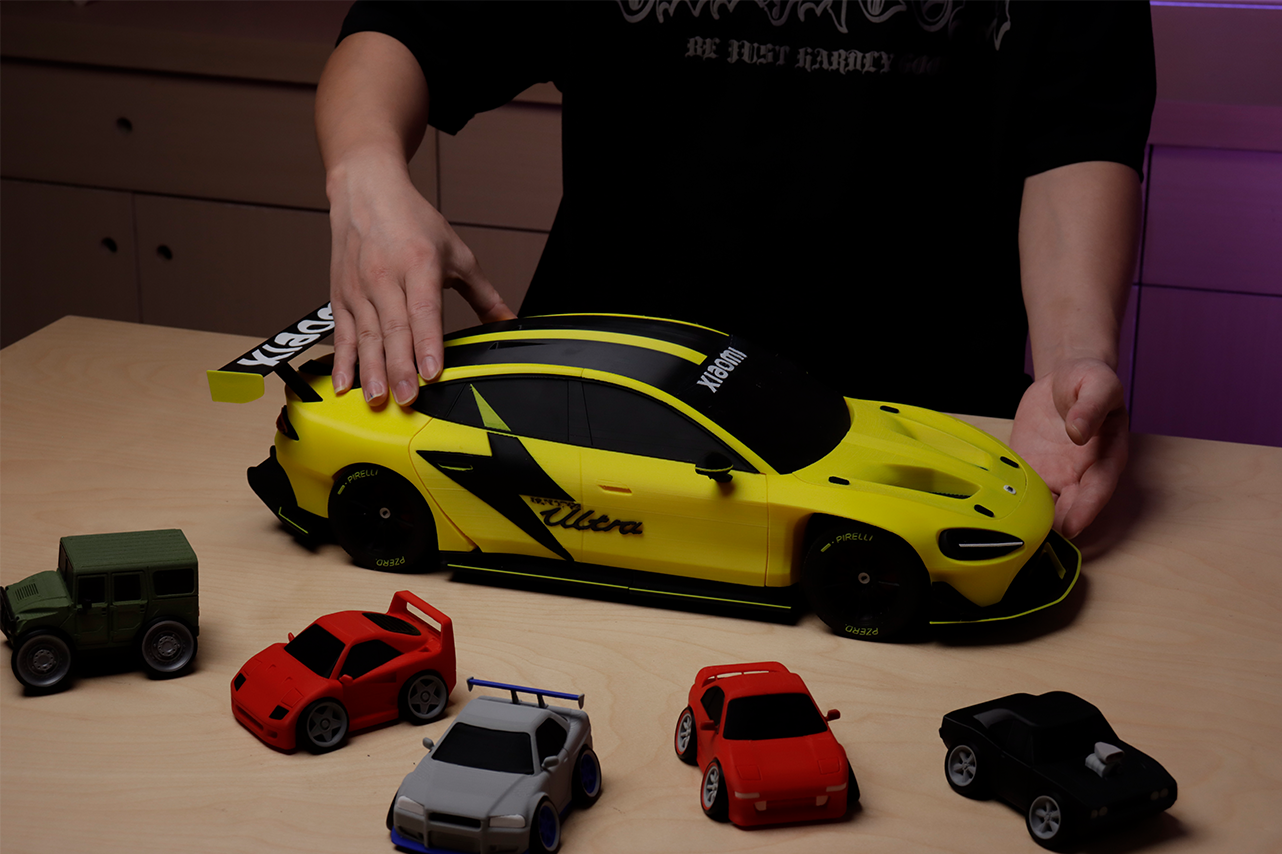
The best multi-color 3D prints are the ones where color does a job, not just decoration. Topographic coasters encode elevation, organizer bins encode contents, anatomical models encode structure. The ten projects below cover functional, artistic, educational, and wearable pieces, and each one teaches a different multi-color skill — from clean two-tone text to full-color lithophanes.

The 10 Projects at a Glance
Use this to pick a starting point. "Colors" is the minimum that makes the project read correctly, not a ceiling.
| Project | Colors | Suggested material | Skill it teaches | Difficulty |
| Topographic map coasters | 3–5 | PLA | Clean color banding by layer height | Beginner |
| Self-watering planter with float indicator | 2 | PETG | Print-in-place clearance plus color contrast | Intermediate |
| Color-coded organizer bins | 2 per bin | PLA or PETG | Embossed text and icons in a second color | Beginner |
| Full-color lithophane lightbox | 4 | Translucent PLA | Color mixing through controlled wall thickness | Advanced |
| Articulated multi-color creature | 3–4 | PLA | Color changes across print-in-place joints | Intermediate |
| Character statuettes | 4–6 | PLA | Sharp boundaries on curved surfaces | Intermediate |
| Themed chess set | 2–4 | PLA or PLA Matte | Consistency across a 32-piece batch | Beginner |
| Anatomical models | 3–6 | PLA | Color as information, not decoration | Intermediate |
| Phone case with inlaid design | 2 | TPU plus PLA or PETG | Bonding a rigid inlay into a flexible body | Advanced |
| Nameplates and desk signs | 2 | PLA | Legible text against a contrasting field | Beginner |
If you have never done a color change before, start at the bottom of that table and work up. A nameplate needs one clean swap; a lithophane needs four filaments held in register for thousands of layers.
Functional 3D Prints for Home and Workshop
One of the most rewarding areas of multi-color printing is creating items that are not only nice to look at but also genuinely useful. The following projects show how adding color can improve the function and usability of everyday objects around your house and in your workspace.
1. Topographic Map Coasters
This project turns geographic data into a set of beautiful and practical coasters. Each color represents a different elevation level, creating a tactile and visual map on your coffee table. They serve as functional art pieces and are great conversation starters. This technique demonstrates precise layering and how color can convey information effectively. The accuracy required to show topographic details highlights the capability of multi-color printing for making data-driven physical objects. For your own version, you can find elevation data for nearly any location—such as a favorite national park or your local terrain—from online sources and convert it into a printable model.
The color logic here is borrowed straight from cartography: hypsometric tints assign a color to each elevation band, which is exactly what a layer-by-layer color change produces for free. Practical tip: set your color changes at layer numbers, not millimetres, and keep the bands at least three layers thick so each one reads as a distinct terrace rather than a smear.
2. Self-Watering Planter with a Color Indicator
This clever design takes the guesswork out of watering plants. It uses an inner reservoir and a brightly colored float that rises to a small window to show the water level. This is a great example of how multi-color printing can produce simple mechanical objects with integrated moving parts. The sharp contrast between the planter's body and the bright float makes the water level easy to read at a glance. When printing, consider using a water-resistant material like PETG for the main body. You can customize the exterior with patterns or choose different float colors to match your home decor.
The float is the part that fails. If it prints in place, it needs enough clearance to move but not so much that it rattles; if it is a separate part, print it slightly undersized and test the fit dry before you glue anything. The clearance guide for snap-fit clips and latches covers the tolerances that apply here too.
3. Color-Coded Organizer Bins
A simple set of organizer bins becomes far more efficient with the strategic use of color. By assigning different colors to bins for specific items—for instance, red for metric bolts and blue for imperial—you can identify parts instantly. This system can significantly streamline your workflow and reduce the time spent searching for small components. The print itself demonstrates how color can be integral to a functional design to improve usability. You can take this further by designing custom icons directly into the bin's surface for specific tools, craft supplies, or electronic components.
Embossed labels work better than engraved ones for a second color, because the slicer can simply assign the raised text to another filament without any modeling gymnastics. Keep the emboss height to two or three layers — enough to guarantee full coverage, little enough that the purge cost stays small.

Creative 3D Prints for Art, Decor, and Pop Culture
Beyond practical items, multi-color printing is a fantastic tool for artistic expression. You can produce detailed decorations, vibrant toys, and personalized figures that would be very difficult to make with a single-color printer and a paintbrush. These projects focus on aesthetic appeal and personalization.
4. Full-Color Lithophane Lightboxes
This project turns a standard lithophane into what looks like a backlit, full-color photograph. When light shines through the print, a vibrant and detailed image appears. This is an advanced application that relies on precisely controlling the thickness of translucent color filaments to blend them into a photorealistic image. Specific software can help convert a digital photo into a 3D model ready for this process. You can turn favorite family photos, pet portraits, or memorable vacation snapshots into unique, illuminated art pieces.
This is the hardest project on the list and the one most worth attempting. It works because thicker plastic passes less light, so wall thickness becomes brightness — and stacking translucent colored layers mixes them the way ink does on paper. The technical background is in how lithophanes turn light into photographic art and the multi-material variant in the mechanics of multi-material color lithophane printing.
5. Articulated, Multi-Color Creatures
A classic print-in-place model, like a flexible dragon or phoenix, becomes much more dynamic with the addition of multiple colors for its body, wings, and eyes. These articulated models demonstrate how to manage complex print-in-place assemblies that have intricate color details. The main challenge is ensuring the moving joints print correctly while keeping the color transitions clean and sharp. For your own creations, you could experiment with gradient effects for the wings or design elemental versions (fire, ice, etc.) using different color palettes.
Watch the seam. On a segmented dragon, every joint is a place where a stray blob from a color change locks the articulation solid. Keeping the wipe tower well away from the model and cleaning the nozzle before each swap is what separates a print that flexes from an expensive paperweight. There is more on this in the guide to printing articulated dragons.
6. Colorful Character Statuettes
You can recreate characters from video games and animated shows with cartoon-accurate colors, directly from the printer, with no painting required. For characters with a distinct visual style, like those from Pokémon or Nintendo games, this method produces a clean, professional-looking statuette. The key to success is the printer’s ability to create sharp, well-defined boundaries between colors. You can print a collection of your favorite characters or design a custom figure of an original character.
Curved boundaries are where multi-color prints betray themselves. A color edge that runs across a sloped surface is spread over several layers, so a small purge shortfall shows up as a haze rather than a line. If a face or logo looks dirty, raise the flush volume for that specific transition before you blame the model.
Instructive 3D Prints for Games and Education
Multi-color printing is also extremely effective for creating objects that teach or entertain. In both games and educational materials, clear visual cues can make complex systems easier to grasp and interactive experiences more engaging.
7. Themed Multi-Color Chess Sets
Go beyond traditional black and white with a chess set where color helps define a theme, like fire versus ice or sci-fi versus fantasy. Using distinct colors and accents for the two opposing sides makes the game more visually interesting. This project is a great example of creating a cohesive set of objects where color is central to the design. You can create your own unique themes, such as cats versus dogs or sets based on historical armies, for a truly personalized gaming experience.
The real lesson in a chess set is repeatability: 32 pieces printed over several sessions must match. Slice the whole side as one plate where the build volume allows, keep the same spool throughout, and note the flush volumes so a replacement pawn six months later still looks like its siblings.
8. Detailed Anatomical Models
Anatomical models become much easier to interpret when printed in multiple colors. In a model of a heart, for example, arteries can be printed in red, veins in blue, and the chambers in different shades to make the circulatory system's structure immediately clear. This use of color adds a layer of scientific accuracy and clarity that is impossible with a single-color print. The same principle can be applied to other educational models, such as a brain with color-coded lobes for different functions, a detailed cell model, or even a T. rex skeleton that distinguishes between bone and cartilage.
This is the clearest case for a soluble support material as a fifth channel. Hollow vessels and undercut chambers are exactly the geometry that ordinary supports scar, and a dissolvable support leaves the interior clean enough to actually teach from.

Personalized 3D Prints for Wearables and Accessories
Perhaps the most popular use for multi-color printing is creating items that are uniquely yours. From custom gear to personalized signs, adding color is a straightforward way to make an object stand out or convey a specific message.
9. Custom Phone Cases with Inlaid Designs
This project showcases an advanced technique: printing a flexible case from a material like TPU and embedding a rigid logo or pattern from PLA or PETG directly into it. The result is a seamless, professional-looking finish where the design is perfectly flush with the case's surface. This multi-material capability allows you to create durable, personalized accessories that can't be made with a single-color printer. You could make cases featuring a company logo, a sports team emblem, or an intricate mosaic pattern.
Two warnings before you start. Rigid and flexible plastics do not always bond chemically, so design the inlay with a mechanical lock — an undercut or a dovetail profile — rather than trusting adhesion alone. And check your feeder's compatibility list: many automatic multi-material units accept only harder flexible grades, because softer TPU buckles in a long feed path. The guide to printing custom TPU phone cases has the settings.
10. Multi-Color Nameplates and Desk Signs
Printing a nameplate is an excellent starting point for learning the basics of multi-color 3D printing. The project teaches the foundational skill of creating sharp, readable text in one color against a contrasting background. Because of its simplicity, it is particularly well-suited for beginners who are using a manual filament swap method. You can create personalized signs for family members' desks, "On Air" signs for a home office, or clear, informative labels for a workshop.
One swap, one layer, one obvious result — which is why it belongs first. Print the plate face-down on a smooth build sheet so the lettering surface comes off glass-flat, and change color on the layer where the text begins rather than modelling the letters as separate bodies.
What You Need to Print These
All ten are achievable on a single-nozzle machine. The difference is how much of the work the printer does for you.
| Setup | Which projects it covers | Catch |
| Manual or M600 filament swap | Coasters, bins, chess set, nameplates — anything with color changes by layer | You must be present at each change |
| Automatic 4-slot feeder | Everything above plus statuettes, articulated creatures, anatomical models | Purge waste scales with the number of changes |
| Feeder plus soluble support channel | Hollow anatomical models and heavily undercut art pieces | Soluble support must be dry before it will feed |
| Rigid plus flexible in one job | Inlaid phone cases | Check the flexible grade is on your feeder's supported list |
A four-slot unit such as the QIDI Box handles the automated cases and chains up to 16 filaments in one job; the current printer lineup supports it across the range. Whichever route you take, keep a spool of contrasting filament on hand — most of these projects only need two colors to look finished.
FAQs About Multi-Color 3D Prints
What are the best multi-color 3D prints for a beginner?
Nameplates, color-coded organizer bins, and a themed chess set. Each needs only one or two color changes at a known layer, so they work on any printer with a manual pause and teach the purge habit before you spend money on hardware.
How many colors do I need for a good multi-color print?
Two is enough for most projects on this list to read correctly. Four is the practical sweet spot for character models and lithophanes. Beyond four, purge waste and print time rise faster than the visual payoff for most designs.
What are the coolest multi-color prints that are also useful?
Topographic coasters and color-coded bins are the two that people actually keep. In both, the color carries information — elevation, contents — so the print stays useful long after the novelty of the color wears off.
Can I do these without a multi-material unit?
Yes for any project where colors stack in horizontal bands: coasters, bins, chess pieces, nameplates. No, realistically, for the ones needing several colors within the same layer, such as character statuettes and full-color lithophanes.
Which filament should I use for multi-color models?
PLA for everything display-oriented: widest color range, lowest print temperature, most forgiving on color changes. PETG for anything that meets water, like the self-watering planter. TPU only for flexible bodies, and only in a grade your feeder supports.
Start Your Multi-Color Printing!
These ten projects are just a sample of what you can accomplish with multi-color 3D printing. As you have seen, adding color can enhance everything from household tools to detailed models, all without the extra step of painting. Pick one from the beginner row of the table, get a single clean color change on the build plate, and the rest is scaling the same skill. The main limit is your own imagination. Happy printing!
- The 10 Projects at a Glance
- Functional 3D Prints for Home and Workshop
- 1. Topographic Map Coasters
- 2. Self-Watering Planter with a Color Indicator
- 3. Color-Coded Organizer Bins
- Creative 3D Prints for Art, Decor, and Pop Culture
- 4. Full-Color Lithophane Lightboxes
- 5. Articulated, Multi-Color Creatures
- 6. Colorful Character Statuettes
- Instructive 3D Prints for Games and Education
- 7. Themed Multi-Color Chess Sets
- 8. Detailed Anatomical Models
- Personalized 3D Prints for Wearables and Accessories
- 9. Custom Phone Cases with Inlaid Designs
- 10. Multi-Color Nameplates and Desk Signs
- What You Need to Print These
- FAQs About Multi-Color 3D Prints
- What are the best multi-color 3D prints for a beginner?
- How many colors do I need for a good multi-color print?
- What are the coolest multi-color prints that are also useful?
- Can I do these without a multi-material unit?
- Which filament should I use for multi-color models?
- Start Your Multi-Color Printing!
Recommended products






