

 Q2
Q2
 QIDI Box
 Plus 4
 Q1 Pro
 X-Max 3


20+ Fun and Practical 3D Printing Projects for Beginners

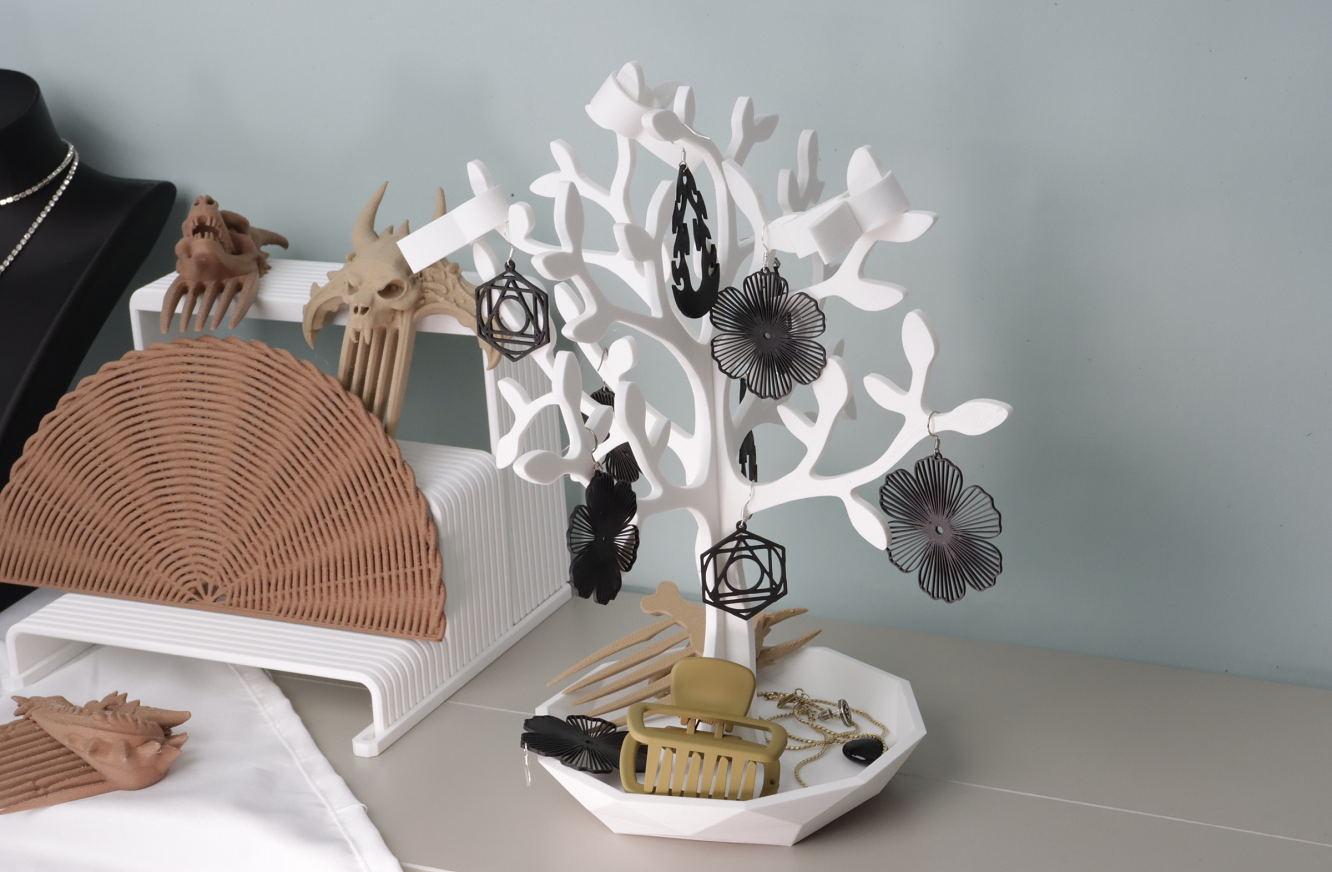
The best 3D printing ideas for beginners are small, fast and forgiving: a print-in-place articulated dragon, a 3DBenchy calibration boat, cable clips, a phone stand, a battery dispenser, drawer dividers. Each finishes in under four hours, uses less than 60 g of PLA, and needs no supports. Print five of those before you attempt anything that runs overnight.
Below are 25 projects grouped by what they teach you, each with a realistic print time, filament weight and difficulty rating so you can plan a weekend instead of guessing. All of them are widely available as free models on community repositories such as Thingiverse. A good habit: pick models with lots of user photos and comments — it is the fastest way to know a design actually prints.
The 25-Project Table: Time, Filament and Difficulty
Figures below assume 0.2 mm layers, 15 % infill and PLA on a modern 300–600 mm/s class machine. Older or slower printers can take roughly double the time.
| Project | Print time | Filament | Material | Supports | Difficulty |
|---|---|---|---|---|---|
| 3DBenchy calibration boat | 35–60 min | 12 g | PLA | No | Easy |
| Cable clips (set of 6) | 40 min | 15 g | PLA or PETG | No | Easy |
| Cute ghost figure | 45 min | 10 g | PLA | No | Easy |
| Bag clips (set of 4) | 50 min | 18 g | PETG | No | Easy |
| Toothpaste squeezer | 1 h | 20 g | PLA | No | Easy |
| Low-poly animal figure | 1–2 h | 25 g | PLA | No | Easy |
| Desktop planter (vase mode) | 1.5 h | 30 g | PLA | No | Easy |
| USB / SD card holder | 1.5 h | 28 g | PLA | No | Easy |
| Shopping bag handle | 1.5 h | 30 g | PETG | No | Easy |
| Phone stand | 2 h | 35 g | PLA | No | Easy |
| Flexi Rex or octopus (print-in-place) | 2–3 h | 40 g | PLA | No | Easy |
| Paint / glue tube squeezer | 2 h | 35 g | PETG | No | Easy |
| Sink drain filter | 2 h | 30 g | PETG | No | Medium |
| Allen key holder | 2.5 h | 45 g | PLA | No | Easy |
| Scraper handle for a utility blade | 2.5 h | 45 g | PETG | No | Medium |
| Headphone stand / under-desk hanger | 3 h | 55 g | PLA | Minimal | Medium |
| Articulated dragon (print-in-place) | 3–5 h | 60 g | PLA | No | Medium |
| Small parts tray, stackable | 3 h | 55 g | PLA | No | Easy |
| Screwdriver bit block | 3 h | 60 g | PETG | No | Medium |
| Collapsible sword (print-in-place) | 4 h | 70 g | PLA | No | Medium |
| Battery dispenser (AA/AAA) | 4–5 h | 90 g | PLA | Minimal | Medium |
| Replacement appliance knob | 1 h + modelling | 15 g | PETG | No | Medium |
| Drawer dividers, measured to fit | 4–6 h | 110 g | PLA | No | Medium |
| Laptop riser (two-piece) | 6–8 h | 150 g | PETG | Minimal | Medium |
| Gridfinity 4×4 baseplate + 6 bins | 8–10 h | 200 g | PLA | No | Medium |
Add up the first ten rows and you get about 12 hours of printing and 220 g of filament — roughly a fifth of a spool for a genuinely useful starter set. One 1 kg spool of PLA Basic covers the entire table with material left over, and an enclosed entry machine such as the Q2C runs every project on it without a single setting change.
Category 1: Quick Wins for Your First Week
Your first few prints should be quick successes. This is the best way to build confidence and learn the basics of how your printer works without getting frustrated. The projects below finish quickly and usually work on the first try.
Print-in-Place Toys (No Assembly Needed)
A print-in-place model is a design whose moving parts are printed already assembled, with deliberate 0.3–0.5 mm gaps between them so the layers never fuse. Nothing to glue, nothing to clip together — it comes off the plate articulated.
- Articulated Dragon or Lizard: A classic that comes off the plate with a flexible body that bends immediately. Roughly 3–5 hours and 60 g.
- Flexi Rex or Octopus: Fun, flexible, and the clearest demonstration of how separate parts print together. Around 2–3 hours.
- Collapsible Sword: Prints as one compact block and then extends to full size. About 4 hours.
Simple Desk Decor
Another good start is small items to personalise your space.
- Low-Poly Characters: Flat geometric facets are extremely forgiving — no overhangs to fail, no fine detail to lose.
- The "Benchy" Boat: The 3DBenchy is a purpose-built torture test released in 2015. Its hull curves, the chimney's overhang, the bow's bridging and the cabin windows each stress a different part of your printer's tuning. Print one, keep it, and compare it against the next one after you change a setting.
- Desktop Planters: A quick project for a succulent or air plant, and the natural place to learn vase mode.
- Cute Ghost Figures: About as simple and fast as a first print gets.

Each successful print builds confidence and teaches you something about your machine. If you own an action camera, a mount is one of the fastest useful prints there is — printing custom GoPro mounts for cyclists covers the handlebar clamp geometry that survives road vibration.
Category 2: Home and Organization Upgrades You Will Use Daily
This is where your printer starts solving small, everyday problems. These practical prints show the real-world value of making exactly what you need.
Desk and Cable Organizers
- Cable Clips: A few simple clips on your desk or nightstand stop charging cords falling behind the furniture. 15 g for a set of six.
- USB/SD Card Holder: A custom tray so you stop losing the small drives.
- Headphone Stand: A basic stand or a desk-edge hanger frees a surprising amount of desk space.
- Phone and Laptop Stands: A phone stand takes two hours; a two-piece laptop riser takes six to eight and noticeably improves screen height.
Kitchen and Household Gadgets
Before printing anything for the kitchen, read the food-safety note below.
- Bag Clips: More durable and more customisable than store-bought clips.
- Toothpaste Squeezer: Simple, effective, and a 20 g print.
- Shopping Bag Handle: Spreads the load of heavy grocery bags across your palm. Print in PETG — PLA can creep under sustained load.
- Sink Drain Filter: A filter sized to your actual sink, which the store version never is.
- Vases and Cups (to learn "Vase Mode"): Vase mode, also called spiralised outer contour, prints a single continuous wall in one unbroken spiral with no infill and no top layer. It is fast, uses very little filament, and produces seamless objects — a technique worth learning early.
A Quick Note on Food Safety
This matters: most standard 3D printing filaments including ordinary PLA are not sold as food-contact materials. The microscopic layer lines in a print trap residue and are difficult to clean thoroughly. For anything that touches food directly, use a filament specifically certified for food contact, or apply a certified food-safe sealant to the finished part — our breakdown of whether PETG is food safe for cookie cutters walks through what the certification actually covers.
Storage upgrades often start with a repair. Printing custom drawer slide spacers covers how to measure and fit a spacer for a drawer that no longer runs straight.
Category 3: Tools and Fixes for Real-World Problems
Beyond simple upgrades, your printer is a problem-solving machine. This is where you stop buying solutions and start making them.
Simple Fixes and Custom-Fit Tools
- Replacement Knobs: When the plastic knob on an appliance breaks, model and print a durable replacement — usually a 15 g, one-hour print once the measuring is done.
- Custom Wrenches and Tools: For the one job where a normal wrench will not fit.
- Scraper Tool: A comfortable handle that holds a standard utility blade — excellent for cleaning your build plate.
- Paint Tube Squeezer: A robust squeezer for tubes of paint or glue. Print in PETG so it does not crack under grip force.
Organization for Your Home and Workshop
- Drawer Dividers: Measure the drawer's interior, subtract 2 mm, and print dividers that fit exactly. Around 110 g for a junk drawer.
- Allen Key Holder: A rack for the tools that came with your 3D printer.
- Battery Dispenser: Stores and dispenses AA or AAA cells one at a time. Classic and satisfying.
- Small Parts Trays and Bit Holders: Stackable trays for screws, or a block that holds every screwdriver bit upright.
- Gridfinity: Gridfinity is an open-source modular storage standard built on a 42 × 42 × 7 mm grid, released by Zack Freedman in 2022. You print a baseplate for a drawer and then any number of compatible bins. The official Gridfinity site hosts the spec, and our Gridfinity starter guide lists the bins worth printing first.
Printing tools and custom fixes marks the transition from hobbyist to practical problem-solver.

Two repair projects worth trying once the basics are working: replacement clips for loose window screens, and a genuinely useful accessibility print, ergonomic pruner handle aids for arthritis.
A Suggested First-Month Order
Printing these in sequence teaches one new skill at a time instead of five at once.
| Week | Skill it teaches | |
|---|---|---|
| 1 | 3DBenchy, then a ghost figure | Reading first-layer quality; baseline calibration |
| 2 | Cable clips, phone stand | Choosing orientation so layers run across the load |
| 3 | Vase-mode planter, articulated dragon | Vase mode; print-in-place clearances |
| 4 | Drawer dividers measured to your drawer | Measuring, tolerancing, and your first real design decision |
Build on Your New Skills
You have gone from trinkets to practical tools. The natural next steps are stronger materials like PETG, and designing your own solutions in free software such as Tinkercad. What useful item will you make next?
FAQ: Beginner 3D Printing Projects
What should I 3D print first?
A 3DBenchy. It takes 35–60 minutes, uses about 12 g of filament, needs no supports, and its bow, chimney and cabin windows each test a different aspect of your printer's tuning. Keep the first one — comparing later Benchys against it is how you tell whether a setting change actually helped.
How long do beginner 3D prints take?
Most beginner projects run 30 minutes to 4 hours at 0.2 mm layers and 15 % infill. Small clips and figures finish inside an hour. Drawer dividers and organizer sets are the first prints that cross four hours. Nothing on a beginner list needs to run overnight.
How much filament does a beginner project use?
Between 10 g and 110 g each. A standard 1 kg spool of PLA covers roughly 20–30 beginner projects, which works out to well under a dollar of material per print for most of them.
What filament should a beginner use?
PLA for almost everything. It prints at low temperatures, barely warps, and is the most forgiving material available. Switch to PETG only for parts that carry sustained load or live in a damp place — bag handles, sink filters, tool handles. Leave ABS and ASA until you have an enclosed machine.
Do beginner projects need supports?
Almost none of them do, and that is deliberate. Supports add failure modes and leave scars you have to sand off. Choose models with overhangs steeper than about 45 degrees from horizontal and you can leave supports switched off entirely for your first month.
Are free 3D models safe to print?
Community-uploaded models vary in quality, not in safety. Sort by popularity and look for a "makes" gallery with real photos — a model with 50 user photos has been debugged by 50 people. Models with no photos and no comments are where beginners lose an evening to a design that was never test-printed.
- The 25-Project Table: Time, Filament and Difficulty
- Category 1: Quick Wins for Your First Week
- Print-in-Place Toys (No Assembly Needed)
- Simple Desk Decor
- Category 2: Home and Organization Upgrades You Will Use Daily
- Desk and Cable Organizers
- Kitchen and Household Gadgets
- A Quick Note on Food Safety
- Category 3: Tools and Fixes for Real-World Problems
- Simple Fixes and Custom-Fit Tools
- Organization for Your Home and Workshop
- A Suggested First-Month Order
- Build on Your New Skills
- FAQ: Beginner 3D Printing Projects
- What should I 3D print first?
- How long do beginner 3D prints take?
- How much filament does a beginner project use?
- What filament should a beginner use?
- Do beginner projects need supports?
- Are free 3D models safe to print?
Recommended products






