

 Q2
Q2
 QIDI Box
 Plus 4
 Q1 Pro
 X-Max 3


The Ultimate Guide to 3D Printing a Cosplay Helmet

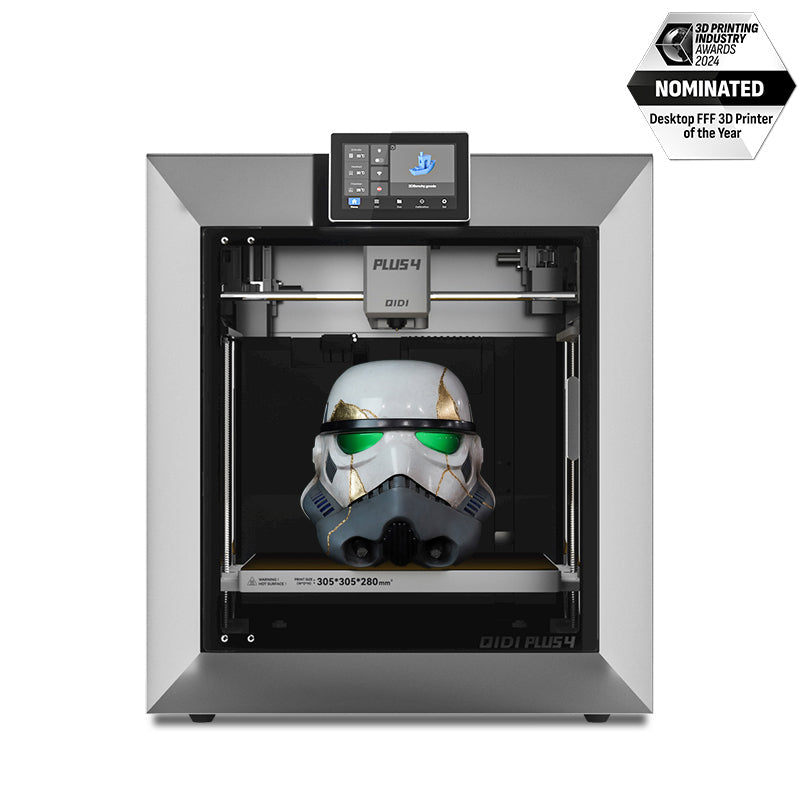
A 3D printed helmet is a wearable prop built from an STL file on a desktop FDM printer, then sanded, primed and painted. Most adult helmets measure roughly 250–290 mm wide and 280–330 mm tall, so a printer with a 300 mm build volume prints one in two halves and a 390 mm machine prints many in a single piece. Budget 40–80 hours of print time and 600–1,200 g of filament.
This guide covers the four decisions that actually determine whether your helmet looks like a movie prop or a plastic bucket: what build volume you need, which filament to run, how to split and key the model, and how far to take the sanding ladder before you spray colour.

What Size 3D Printer Do You Need for a Helmet?
This is the question that decides everything downstream, so answer it first. A helmet that has to be cut into six pieces means six seams to glue, fill and sand — and every seam is a place the finish can crack later.
Measure your head circumference with a soft tape, just above the ears and across the brow. Most adults land between 550 and 600 mm. A wearable helmet needs roughly 15–25 mm of clearance on each side for padding, which puts the outer shell of a typical closed helmet at 250–290 mm wide and 280–330 mm tall including the crest or fin.
| Build volume | Typical helmet split | Seams to finish | Example machine class |
|---|---|---|---|
| 220 × 220 × 250 mm | 4–6 pieces | 4–6 | Entry-level open-frame |
| 270 × 270 × 256 mm | 2–4 pieces (top / face / back) | 2–4 | Q2C and Q2 |
| 320 × 320 × 300 mm | 2 pieces (clean vertical halves) | 1 | Plus 5 |
| 390 × 390 × 340 mm | Most helmets in one piece | 0 | Max4 |
The jump from four seams to zero is the single biggest time saver in the whole project. Each seam realistically costs an evening of epoxy, filler and sanding. If you are choosing hardware specifically for props, read the large-format build volume breakdown before you buy — and if you are still narrowing the field generally, how to find the right printer for your projects covers the rest of the spec sheet.
What Do You Need for Cosplay 3D Printing?
Getting organized before you start is the secret to a less stressful project. Think of this as your shopping list. With this gear on hand, you’ll be ready to tackle a helmet print with confidence.
A Capable 3D Printer
You don't need the most expensive model, but a few features make printing large objects far easier.
- Large Build Volume: 300 × 300 × 300 mm is a good target. This lets you print most helmets in one or two pieces, which means less time spent gluing and sanding parts together.
- Enclosed 3D Printer: A printer with a fully enclosed build chamber is a game-changer for materials like ABS. The enclosure holds heat around the part, which keeps the corners of a tall print from lifting off the plate and warping.
- A Reliable Heated Bed: A heated bed is what gets that all-important first layer to stick down properly across a 250 mm footprint, setting you up for a successful print.
The Right Filament
Filament is the plastic spool that your printer uses to build your helmet. The type you choose affects the final strength, weight, and how easy it is to work with. Here’s a breakdown of the best options for cosplay, with the numbers that matter:
| Filament | Nozzle / bed | Softens near | Pros | Cons |
| PLA / PLA+ | 200–220 °C / 55–60 °C | ~60 °C | Easiest to print, cheapest, holds fine detail. Best for first helmets and display pieces. | Brittle at thin walls; will sag in a hot car or under stage lights. |
| PETG | 230–250 °C / 70–80 °C | ~80 °C | Tough and slightly flexible, so it survives being dropped at a con. | Strings more than PLA; sands gummier, needs wet sanding. |
| ABS | 240–260 °C / 100–110 °C | ~100 °C | Sands beautifully, and acetone vapour can smooth it without sanding at all. | Needs an enclosure, warps easily, has a strong odour while printing. |
| ASA | 245–265 °C / 100–110 °C | ~105 °C | ABS-like sanding plus real UV resistance, for props that live outdoors. | Same enclosure and odour requirements as ABS, costs more. |
For a first helmet, PLA is the right answer almost every time. It is forgiving, it holds crisp panel lines, and after primer nobody can tell what it was printed in. Move to ABS or ASA only when you specifically want acetone smoothing or outdoor durability — the complete filament types guide covers the full property comparison.
Digital & Physical Tools
Finally, grab these supplies to round out your kit.
- 3D Model Files (.STL/.OBJ/.3MF): Free files are shared on community repositories such as Thingiverse's cosplay tag, and paid, screen-accurate models are sold by independent designers. Check the file's reported dimensions before you buy — many props are modelled at display scale, not head scale.
- Slicing Software: A slicer converts your model into the layer-by-layer G-code instructions your printer executes.
- Finishing Supplies: Sandpaper in 120, 240, 400 and 800 grit, a strong glue (like 2-part epoxy), automotive filler primer, and your paints of choice.
How to Print a Cosplay Helmet in 3 Steps
Alright, you’ve got your gear. Now it’s time to actually print this thing. Be prepared: a helmet is a long print, so the name of the game is patience.

Step 1: Splitting, Keying and Slicing
If the helmet does not fit your plate in one piece, cut it deliberately rather than letting the slicer guess. Split along a natural panel line — the brow ridge, the jaw line, the back of the crown — so the seam hides in the design instead of running across a smooth cheek. Add alignment pins (most slicers have a cut tool with a dowel option) so the halves can only go together one way.
These slicer settings are a reliable starting point for a cosplay helmet:
| Setting | Value | Why |
|---|---|---|
| Layer height | 0.16–0.20 mm | Detail you can still sand out. Finer layers triple the time for no visible gain after primer. |
| Walls | 3–4 (1.2–1.6 mm) | Wall count, not infill, is what stops a helmet cracking when it is dropped. |
| Infill | 10–15 %, gyroid | A helmet carries no load. More infill only adds weight on your neck. |
| Supports | Tree, on build plate only | Far easier to snap off a curved shell than grid supports. |
| Adhesion | Brim, 5–8 mm | A 250 mm footprint has a lot of leverage to peel. A brim is cheap insurance. |
If you have not tuned supports before, the tree support guide explains where they help and where they scar the surface.
Step 2: Ensuring a Perfect First Layer
Seriously, the first 10 minutes of a 40-hour print are the most important. Confirm the bed is level and clean — isopropyl alcohol on a PEI sheet removes the finger oils that cause mid-print detachment. Watch the first layer go down. You’re looking for clean, slightly squished lines with no gaps between them. If that first layer is perfect, you can relax a little.
Step 3: Print Time and Filament Budget
For the next day or two the printer will be running unattended. Here is roughly what to expect, at 0.2 mm layers, 3 walls and 12 % infill:
| Helmet type | Approx. filament | Approx. print time | Spools needed |
|---|---|---|---|
| Half-helmet / face shield | 250–400 g | 18–28 h | 1 |
| Closed helmet, smooth shell | 600–900 g | 40–60 h | 1 |
| Closed helmet with crest / horns | 900–1,200 g | 60–80 h | 2 |
| Full helmet plus neck seal ring | 1,100–1,500 g | 70–100 h | 2 |
Those figures assume a machine running in the 300–600 mm/s class. Slower legacy printers can double them. Check in every few hours rather than watching continuously — you are looking for a spool that has snagged, or a support tower that has come loose.
How to Smooth and Paint Your 3D Printed Helmet
What comes off the printer is just the raw form. The steps you take now are what will make your helmet look like a professional prop.
Step 1: Cleanup & Assembly
Once the print is done and cool, carefully remove it. The first task is breaking off all those support structures. Take your time and use small pliers so you don’t damage the surface. If you printed the helmet in pieces, use 2-part epoxy to glue them together, clamp for the full cure time, then fill the seam with body filler before any sanding starts.
Step 2: The Sanding Ladder
This part takes the most work, but it’s what makes the biggest difference. Your goal is to make the horizontal layer lines disappear. Work the ladder in order and do not skip grits — jumping from 120 straight to 400 just polishes the scratches you left behind.
| Stage | Grit | What it does |
|---|---|---|
| 1. Knock down | 120 | Removes layer ridges and support scars. Dry sand. |
| 2. Filler primer | — | 2–3 light coats. Fills what sanding cannot reach and shows you the remaining flaws. |
| 3. Level | 240 | Cuts the primer back until only the low spots stay grey. |
| 4. Refine | 400 | Second primer coat, then sand again. Most props are finished here. |
| 5. Glass finish | 800, wet | Only needed for gloss colours, which show every flaw. |
Sanding printed plastic makes fine dust. Work in a ventilated space and wear a fitted particulate mask — OSHA's respiratory protection overview explains the difference between a dust mask and a rated respirator. Our step-by-step sanding and polishing walkthrough and the broader post-processing guide go deeper on each stage.
Step 3: Painting & Finishing
You're at the final step. Always start with one last coat of regular primer — it helps the paint stick and gives you an even colour base. Spray paints handle the main colours; small acrylics and brushes are for details, weathering and battle damage. Finish with a matte or gloss clear coat to protect the work. Then line the inside with closed-cell foam so the helmet sits on your head rather than on your ears.
What About Flexible Armour Pieces?
A rigid helmet is only half a costume. Gauntlets, joints and under-suit padding move with the body, and those parts are far better printed in TPU than in PLA. If your build extends past the helmet, the TPU flexible cosplay armour guide covers shore hardness, wall counts and the slow print speeds flexibles need.
Your Cosplay Legend Begins: Final Thoughts & Next Steps
Holding that finished helmet is a genuinely good feeling. You took a digital file and turned it into a real, solid object you can wear. It took time, but you now have a piece of gear that is entirely custom and made by you.
Don't stop here. The fastest way to improve is to share what you have made and study what other people are doing — the cosplay community spans decades of prop-making technique that long predates 3D printing, and much of it transfers directly. Go make something awesome.
FAQs About 3D Printing Cosplay Helmets
How long does it take to 3D print a helmet?
A closed adult helmet takes roughly 40–80 hours of print time at 0.2 mm layers, plus 10–20 hours of hands-on finishing spread over a week or two. Half-helmets and face shields finish in 18–28 hours. Print time scales with surface area and wall count, not with infill, so raising infill costs weight without costing much time.
How much filament does a cosplay helmet use?
Between 600 g and 1,200 g for a full closed helmet at 3 walls and 10–15 % infill. A single 1 kg spool covers most smooth-shell designs; buy two if the helmet has a crest, horns or a separate neck ring. Buying both spools from the same batch avoids a visible colour shift across the seam.
What size 3D printer do I need to print a helmet in one piece?
Roughly 350 × 350 × 330 mm or larger. Most adult helmets are 250–290 mm wide and 280–330 mm tall, so a 390 × 390 × 340 mm machine prints the majority in a single job. On a 300 mm-class machine you print clean vertical halves, which leaves one seam. Anything under 250 mm means four or more pieces.
How do I make sure the helmet fits my head?
Measure your head circumference around the brow and above the ears, then scale the model so the interior clears that measurement by 15–25 mm for padding. Free tools such as Meshmixer or Blender let you scale and hollow the mesh before slicing. Print a 40 mm test ring of the brow cross-section first — it takes 20 minutes and saves a 60-hour mistake.
My finished helmet feels fragile. How can I reinforce it?
Reinforce from the inside. A layer of fibreglass cloth wetted out with epoxy resin on the interior surface adds a rigid shell without changing the exterior you just finished. Raising the wall count to four on the reprint is the cheaper preventive fix.
Can I skip sanding with a resin coating?
Partly. A self-levelling epoxy coating such as XTC-3D fills layer lines and cuts sanding time considerably. The trade-off is that a heavy coat softens fine panel lines and engraved detail, so it suits smooth organic shells better than mechanical, greebled designs.
Is it safe to pause a 40-hour print overnight?
A modern printer resumes cleanly from a pause, but a pause longer than about a minute lets the nozzle ooze and leaves a small witness mark on the surface. Pausing to change a spool is normal and the mark sands out. Pausing for hours is not worth it — let the print run.
- What Size 3D Printer Do You Need for a Helmet?
- What Do You Need for Cosplay 3D Printing?
- A Capable 3D Printer
- The Right Filament
- Digital & Physical Tools
- How to Print a Cosplay Helmet in 3 Steps
- Step 1: Splitting, Keying and Slicing
- Step 2: Ensuring a Perfect First Layer
- Step 3: Print Time and Filament Budget
- How to Smooth and Paint Your 3D Printed Helmet
- Step 1: Cleanup & Assembly
- Step 2: The Sanding Ladder
- Step 3: Painting & Finishing
- What About Flexible Armour Pieces?
- Your Cosplay Legend Begins: Final Thoughts & Next Steps
- FAQs About 3D Printing Cosplay Helmets
- How long does it take to 3D print a helmet?
- How much filament does a cosplay helmet use?
- What size 3D printer do I need to print a helmet in one piece?
- How do I make sure the helmet fits my head?
- My finished helmet feels fragile. How can I reinforce it?
- Can I skip sanding with a resin coating?
- Is it safe to pause a 40-hour print overnight?
Recommended products






